






How to Troubleshoot Microsoft Teams and VoIP Call Quality Issues with Packet Analysis
Microsoft Teams has become the communications platform of choice for many organizations, but when calls start dropping, audio becomes choppy, or video quality deteriorates, finding the root cause can be frustratingly difficult.
Most IT teams already have monitoring dashboards, performance metrics, and alerting systems. The problem is that those tools often tell you that something is wrong without clearly identifying why it is happening.
This is where packet analysis provides a different perspective.
Teneo’s Network Performance Monitoring & Diagnostics (NPMD) solution, powered by Allegro Packets, gives IT teams packet-level visibility into Microsoft Teams, VoIP, application, and network traffic. Rather than relying solely on logs and summarized telemetry, packet analysis allows engineers to examine the actual network conversations taking place and identify the source of call quality issues with evidence rather than assumptions.
Why Microsoft Teams Troubleshooting Is Often Difficult
When a user reports poor call quality, there are numerous possible causes:
- Packet loss
- Excessive jitter
- High latency
- Wireless network issues
- WAN congestion
- ISP problems
- Microsoft cloud connectivity issues
- Endpoint performance limitations
- QoS configuration problems
The challenge is that each tool often shows only part of the picture.
A network monitoring platform may indicate increased utilization. Microsoft Teams dashboards may report degraded call quality. Server monitoring tools may show healthy infrastructure. Meanwhile, the user simply knows the call quality is poor.
Without packet-level evidence, troubleshooting frequently becomes a process of elimination rather than direct validation.
Packets Remain the Ultimate Source of Truth
 Figure 1. Top Users Dashboard displaying active network traffic, top senders and receivers, and protocol activity including RTP, TLS, and QUIC traffic during an active Microsoft Teams session.
One lesson I’ve learned repeatedly in my time as a network engineer is that packets are still the closest thing we have to an objective record of what actually happened on a network.
Logs can be incomplete. Dashboards summarize behavior. Metrics tell us that something exceeded a threshold.
Packets show what was actually transmitted, when it occurred, how long it took, and whether it arrived successfully.
Most experienced network engineers already understand this. The challenge isn’t convincing people that packets have value. The challenge is making packet analysis practical in today’s high-speed enterprise networks.
I recently worked with an organization that had upgraded portions of its backbone to 80 Gbps. They were already believers in packet analysis and understood that packets represented the ultimate source of truth. Their challenge was different. As traffic volumes increased, the amount of data available for analysis grew dramatically. Finding the information that mattered during a Microsoft Teams troubleshooting exercise became increasingly difficult due simply to the massive amount of data to analyze.
This is a common problem across modern enterprises.
Capturing packets at modern network speeds is no trivial task. As bandwidth continues to increase, many traditional packet capture solutions struggle to keep up while retaining the data needed for meaningful analysis. Add to that the challenge of finding the right packets fast enough to support operational troubleshooting, and it’s easy to see why many organizations struggle to move from packet collection to actionable insight.
Modern packet analysis platforms such as Allegro address this challenge by being engineered for speed as much as visibility. Fast search, real-time analytics, and high-performance processing helps move from “we have the packets” to “we have the answer.” This becomes especially important when users are waiting for IT to resolve Microsoft Teams call quality issues or other VoIP performance problems.
The Key Metrics Behind Teams and VoIP Call Quality
Several network metrics have a direct impact on real-time communications.
Jitter
Jitter measures variations in packet arrival times.
When voice or video packets arrive inconsistently, users may experience:
- Robotic audio
- Choppy conversations
- Video stuttering
- Delayed speech
Packet Loss
Packet loss occurs when packets never reach their destination.
Even small amounts of packet loss can create noticeable issues during voice and video calls, including:
- Missing words
- Audio clipping
- Frozen video
- Unexpected call degradation
Latency
Latency measures how long network traffic takes to travel between endpoints.
Excessive latency can result in:
- Delayed conversations
- Users talking over one another
- Poor meeting experiences
MOS Scores
Mean Opinion Score (MOS) is a commonly used measurement of perceived voice quality.
MOS provides a useful way to quantify user experience and identify calls that warrant further investigation.
RTP Analysis
Microsoft Teams uses Real-time Transport Protocol (RTP) for audio and video communications.
Analyzing RTP traffic provides visibility into:
- Packet loss
- Jitter
- Latency variation
- Stream quality
Because RTP headers remain visible even when the media itself is encrypted, packet analysis can still provide valuable insight into communication quality.
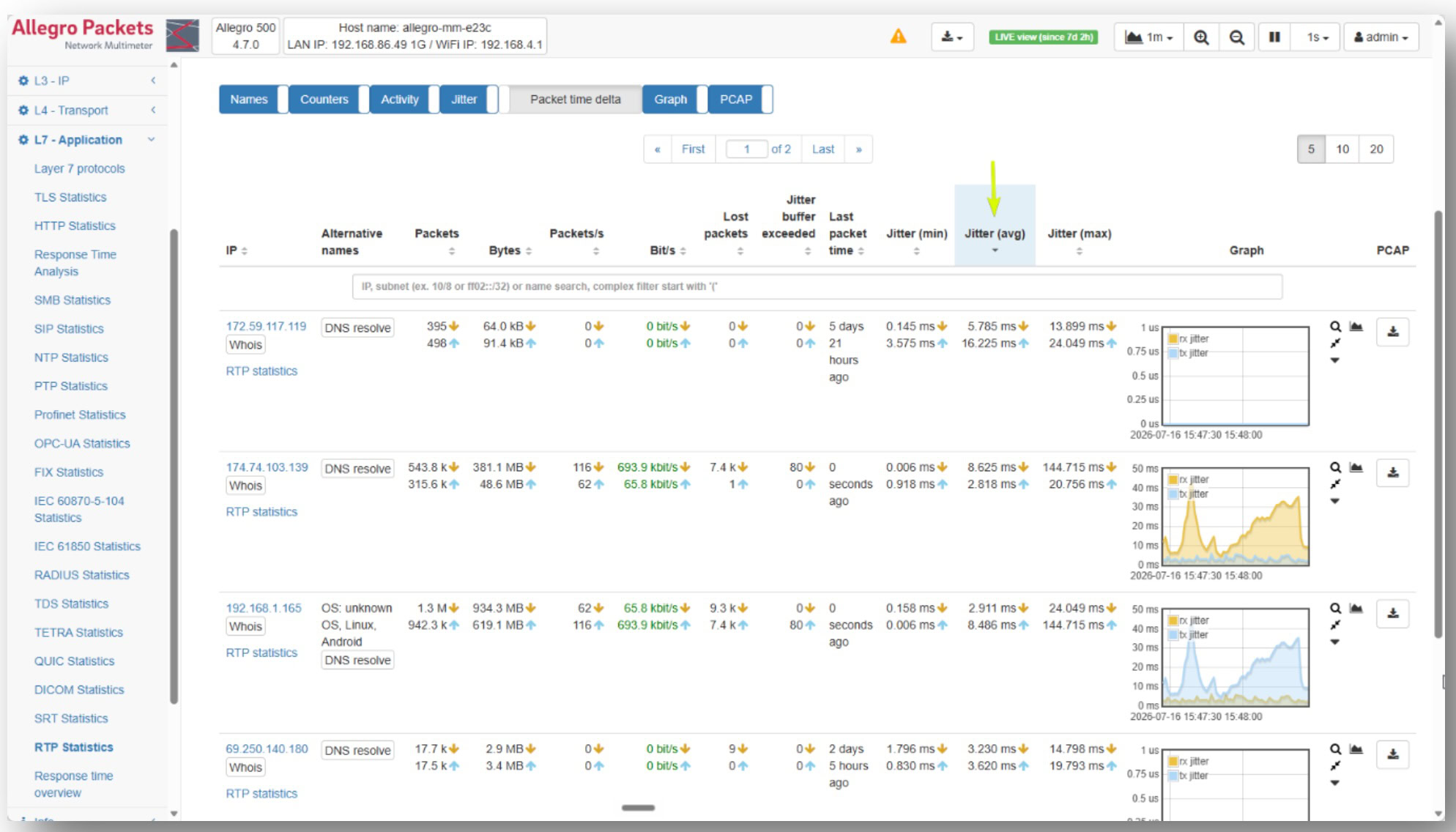
Figure 2. RTP statistics showing packet loss, packet rates, and jitter measurements for active real-time communications traffic.
A Practical Troubleshooting Workflow
When troubleshooting Microsoft Teams call quality, packet analysis provides a structured approach.
Step 1: Identify Impacted Users and Conversations
The first step is determining which sessions experienced degradation and when the issue occurred.
Packet-based visibility allows quickly narrowing investigations to specific communications rather than searching through broad infrastructure data sets.
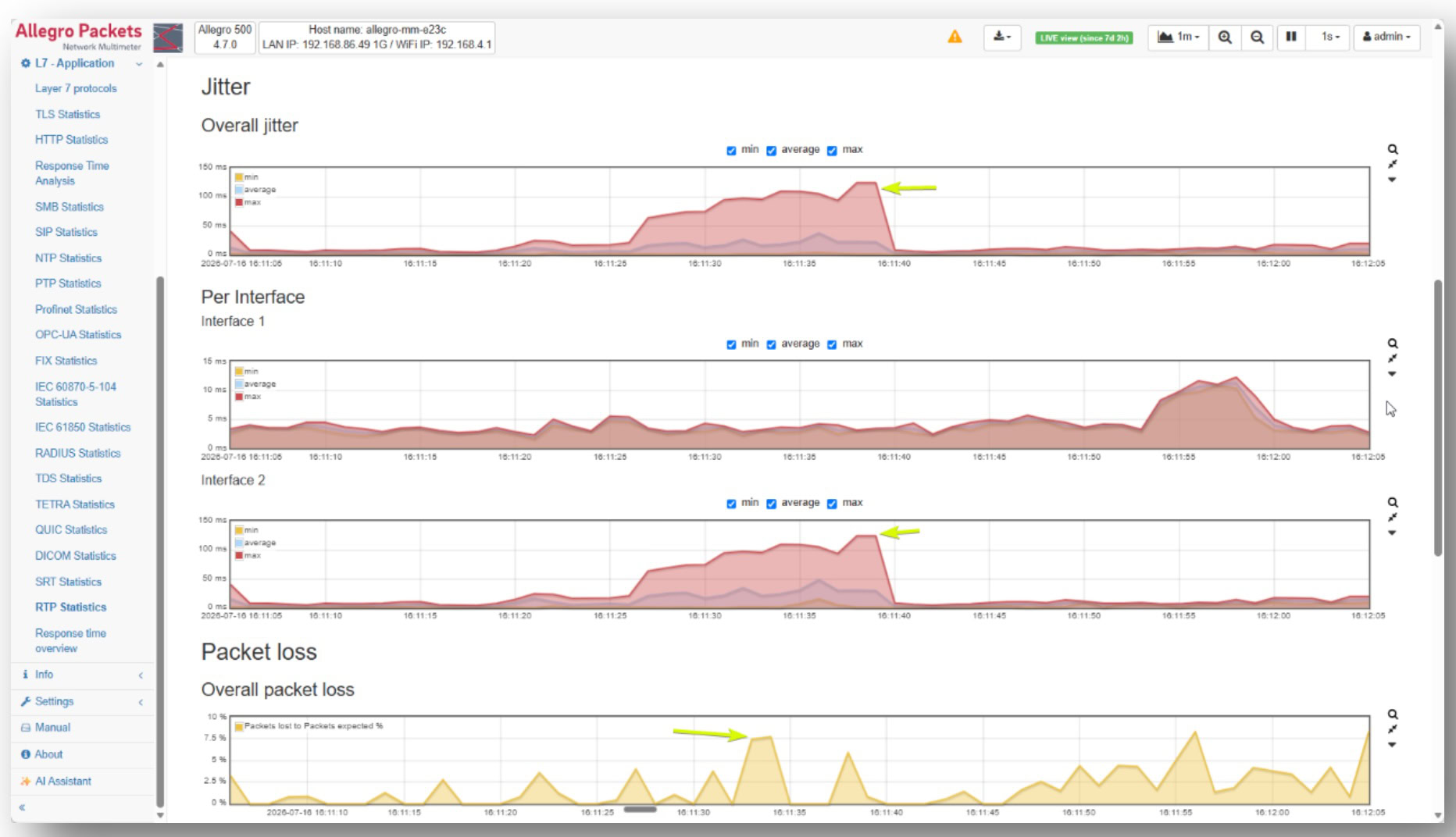
Figure 3. RTP quality trends showing overall and per-interface jitter measurements alongside RTP packet loss over time.
Step 2: Review RTP Quality Metrics
Once the affected sessions are identified, engineers can examine RTP performance indicators such as:
- Packet loss
- Jitter
- Latency
- Stream quality
This immediately reveals whether communications quality was affected at the network level.
Step 3: Analyze Network Behavior
If call quality degradation exists, the next step is understanding why.
Packet analysis can expose:
- TCP retransmissions
- Excessive round-trip times
- Congestion
- Receiver-side buffering issues
- WAN performance limitations
These indicators frequently point directly toward the underlying source of the problem.
Step 4: Validate Root Cause
Instead of debating whether the issue originated with the client, network, service provider, or application, packet-level evidence allows teams to validate what actually occurred.
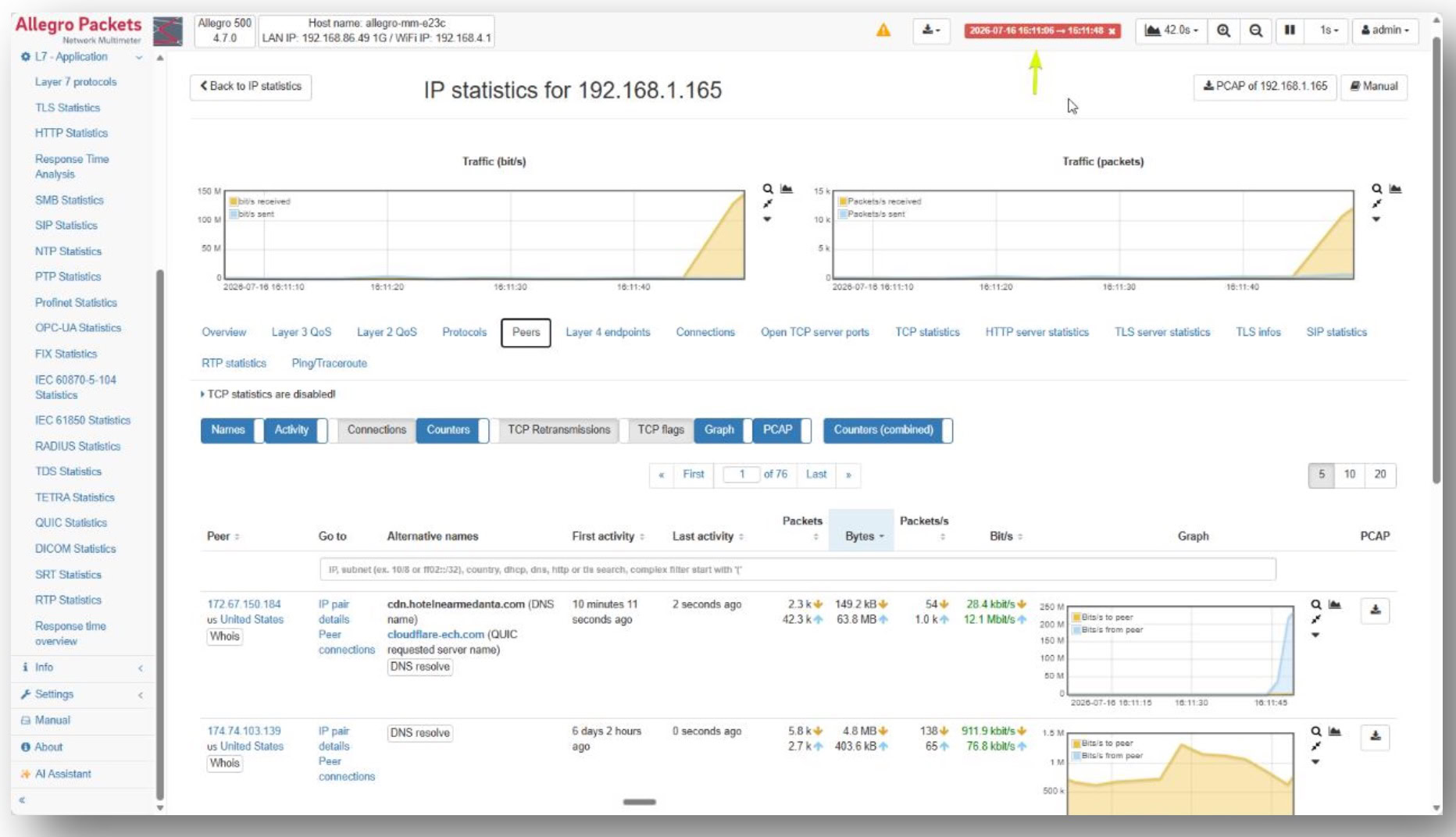
Figure 4. Peer analysis showing the communication relationships associated with a selected endpoint, allowing engineers to identify the systems participating in a real-time communication session.
This reduces troubleshooting time, eliminates guesswork, and minimizes finger-pointing between operational teams.
Why Speed Matters During Teams Outages
Packet analysis has always been valuable.
What has changed is the speed required to make it operationally useful.
Modern enterprises generate significantly more traffic than they did even a few years ago. Cloud adoption, video collaboration, hybrid work, and growing network speeds have increased both the importance and complexity of packet-based troubleshooting.
When a Teams bridge supporting an executive meeting experiences performance issues, nobody wants to wait hours to sift through packet captures.
The faster engineers can search, filter, correlate, and analyze traffic, the faster they can identify whether the issue is packet loss, jitter, WAN congestion, wireless instability, or something else entirely.
The goal is not simply visibility.
The goal is actionable visibility delivered quickly enough to support business operations.
Beyond Microsoft Teams
Although Teams is a common use case, the same packet analysis approach can be applied across virtually any unified communications environment.
This includes:
- SIP-based voice services
- Cisco collaboration platforms
- Zoom
- Webex
- Contact center solutions
- Hybrid communication environments
The troubleshooting methodology remains the same: start with packet-level evidence and allow the data to guide the investigation.
Conclusion
After years of troubleshooting networks, I’ve found that most Teams and VoIP investigations eventually come back to the same question:
What do the packets say?
Logs, dashboards, and monitoring platforms all provide useful clues, but packets remain the closest thing we have to a ground-truth record of network behavior.
The challenge is making that information accessible quickly enough to support operational troubleshooting.
Teneo’s Network Performance Monitoring & Diagnostics (NPMD) solution, powered by Allegro Packets, helps organizations do exactly that by combining packet capture, packet analysis, RTP visibility, and rapid search capabilities into a platform designed for modern enterprise environments. Rather than guessing where the problem might be, teams can use packet-level evidence to determine where the problem actually exists and resolve it with confidence.
Ready to Troubleshoot Faster?
If your team is spending too much time trying to determine whether call quality issues are caused by the network, endpoint, application, or cloud provider, packet analysis can help.
Book a demo to see how Teneo’s NPMD solution, powered by Allegro Packets, gives IT teams the packet-level visibility needed to investigate Microsoft Teams, VoIP, and network performance issues with confidence.